
Force Byte
Useful Tips on Computer Usage (7)
Last time I talked about the common error messages of IE and their possible solutions. This time I will introduce more useful tips on using IE for web-surfing.
Speed Up The Input In The "Address" Field
Suppose now you would like to connect to the website, "http://www.yahoo.com", you just need to type "yahoo" in the "Address" field and then press
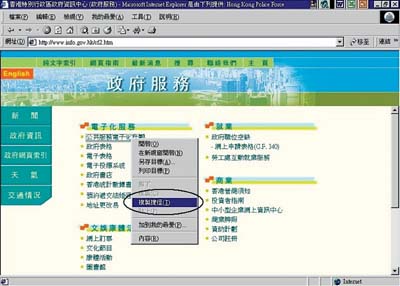
I believe that you have already created a number of shortcuts for those commonly-used documents on the desktop so that you can open them at once with the associated applications such as Word and Excel to continue with your daily work. Such a way can undoubtedly help you save time in looking around for the applications and documents separately. Similarly, you can do the same for your favorite websites, so that you can quickly access them. Simply follow these steps:
1. Right click on the white space of the web page. Then choose "Copy Shortcut" from the Shortcut menu.
2. After clicking "OK", the shortcut for the website is created on your desktop. You can access the website by clicking this shortcut later on.
Other than the "Favorites" menu, you can add any web pages of particular interest to the "Link" menu. You can easily find it on the right-hand side of the IE window and just below the "Force Badge" (as circled in the figure below).
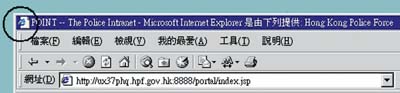
1. Directly drag the web page icon on the left-hand side of the Title Bar of the IE Window (as circled in the figure below) to the "Link" menu; or
3. Find the link in the "Favorites" menu and drag it to the "Links" folder inside.
At this moment, you can double-click the "Links" menu to expand it to show all web page icons inside, and then click the icon of your favorite web page to go.
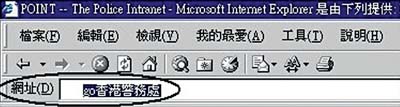
When searching a website, you usually go to some search engines (e.g. www.yahoo.com). In fact, you can type "Go", "Find" or "?" followed by a searching criteria in the "Address" field, such as "Go Hong Kong Police Force", IE will search it through the MSN search engine.
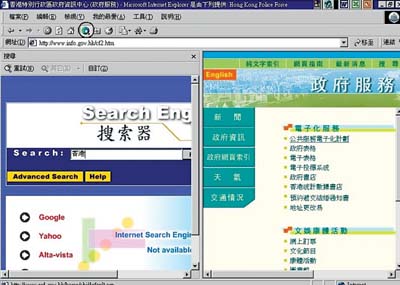
You can also click the "Search" button (the Globe as circled in the figure below) in the IE tool bar for searching. The "Search Engine" page will appear on the left-hand side of the IE window. Then you can input the keyword(s) of the website in the "Search" input field of the page. Once the "Find" button has been clicked, the search will start immediately.

Create Shortcut Of Favorite Website On The Desktop
Add Web Pages To "Link" Menu

To add a web page into the "Link" menu, you can choose any one of the following three ways:
2. Drag the link on the web page to the "Link" menu; or

Search Web Pages In The "Address" Field
Click The "Search" Button Of IE
Don't you think that they are really easy to learn and useful? Let's continue on other kinds of IE tips next time.
'Sharing IT as it applies to your daily life'
(Email address: 'ITB_ForceByte_Editor@police.gov.hk')